 Sales & Marketing Automation
The CRM and Marketing Automation Guru's You Can Trust.
Sales & Marketing Automation
Most B2B organizations treat their pardot salesforce integration as a static technical checkbox; however, this narrow perspective is the primary reason lead pipelines stall and data integrity crumbles. You’ve likely encountered the systemic friction of marketing leads failing to sync or the persistent headache of duplicate records that erode sales team trust. It’s exhausting to manage an environment where the marketing dashboard doesn’t reflect the CRM reality, leaving you to defend ROI based on fragmented data.
This blueprint provides the technical configuration and strategic orchestration required to align Marketing Cloud Account Engagement (formerly Pardot) with Salesforce for seamless revenue growth. You’ll learn how to master the V2 connector nuances and establish a bidirectional data flow that functions with precision. We’ll examine the specific frameworks needed to automate lead assignment and secure accurate reporting across the entire funnel, ensuring your infrastructure is built for systemic integrity and long-term scalability through 2026.
A high-performing revenue engine requires more than just two powerful platforms; it demands a seamless conduit between marketing intent and sales execution. The pardot salesforce integration serves as this critical bridge, functioning as the primary nervous system for B2B data flow. By synchronizing prospect behavior with CRM records, the connector ensures that every digital interaction is captured and actionable. This isn’t just a simple data sync. It’s the operationalization of your entire go-to-market strategy.
The evolution of the platform has moved decisively beyond the era of standalone tools. What was once known as Pardot is now officially Marketing Cloud Account Engagement, a transition that signals a deeper embedding within the broader Salesforce ecosystem. This shift means the integration is no longer an external attachment but a native extension of the core platform architecture. For the strategic architect, this implies that data governance, user permissions, and object mapping must be managed with the same rigor as any other core CRM function.
Bidirectional sync forms the bedrock of a modern Revenue Operations (RevOps) strategy. When marketing and sales share a single source of truth, the entire customer lifecycle becomes visible and measurable. This unified view eliminates the “black box” of marketing attribution. It allows leadership to identify precisely which campaigns drive revenue and which parts of the funnel are leaking prospects. Without this alignment, your teams are essentially operating in the dark, relying on anecdotal evidence rather than hard data to make scaling decisions. Before committing fully to this ecosystem, B2B leaders evaluating their automation stack should review a thorough pardot vs hubspot comparison to ensure they are building on the right foundation for their long-term revenue goals.
By 2026, the V2 connector has become the non-negotiable standard for all new implementations. Unlike legacy V1 configurations that required manual mapping and complex upkeep, the V2 architecture offers a more streamlined experience that simplifies the initial handshake between platforms. One critical advancement is the requirement of a dedicated B2BMA Integration User. This dedicated user profile enhances data security by ensuring that sync activities are isolated and audited, preventing the security risks that plagued older setups where individual user credentials were often shared.
Technical integration is, at its heart, a sales enablement strategy. When the pardot salesforce integration is optimized, sales representatives gain immediate visibility into prospect engagement directly within their Lead and Contact views. They don’t have to guess what a prospect is interested in because the engagement history is available in real time. This transparency eliminates operational silos, fostering a collaborative environment where marketing feeds sales with high-intent leads. Maintaining this level of alignment requires ongoing vigilance, which is why many firms leverage professional pardot audit services to identify and resolve sync errors before they impact the bottom line.
Execute the installation of the Pardot AppExchange package as the foundational step in your pardot salesforce integration. This package provides the necessary custom fields, Visualforce pages, and permission sets required for the two platforms to communicate effectively. Before you begin the installation, verify that your Salesforce edition is compatible and that you have the administrative authority to modify the schema. Once the package is active, navigate to the Pardot Account Setup within Salesforce to initiate the connector handshake. For detailed technical specifications on this initial setup, refer to the official Salesforce-Pardot Connector implementation documentation.
Assigning the “Pardot Connector User” permission set is the next critical milestone. This step grants the necessary read and write access to the objects that drive your revenue engine. In the V2 architecture, you’ll configure the B2BMA Integration User to handle the heavy lifting of data flow. This approach is highly efficient because it allows for continuous synchronization without consuming a standard Salesforce user license. The Integration User is a non-human user record that facilitates data sync between platforms. If your current configuration feels unstable or leads are failing to appear, a strategic audit can pinpoint exactly where the handshake is failing.
Establish a clear map between Salesforce users and Pardot users to maintain consistent lead ownership across the customer journey. Utilize Salesforce User Sync to automate this process, ensuring that when a rep is added or removed in the CRM, their marketing automation profile updates accordingly. Implementing Single Sign-On (SSO) is mandatory for security and a frictionless user experience. It allows your team to move between platforms without the fatigue of multiple credentials, while also centralizing your access governance.
Secure the pardot salesforce integration by configuring your network security settings to allow seamless API communication. Ensure that Pardot’s IP ranges are correctly whitelisted within your Salesforce org to prevent blocked requests during high-volume data transfers. You must also refine Salesforce sharing settings to allow the Integration User to write to specific objects like Leads, Contacts, and Accounts. This granular control ensures that data flows where it’s needed while maintaining the integrity of your overall security architecture.
Establishing a high-functioning pardot salesforce integration requires more than a successful technical handshake; it demands a defined hierarchy of truth. Data discrepancies often arise when both platforms attempt to update the same field simultaneously without a clear governor. To prevent this, you must determine which system “wins” for every shared data point. Salesforce typically serves as the authoritative system of record for firmographic and sales-validated data, while Pardot acts as the primary incubator for behavioral engagement and marketing preferences.
The sync behavior varies significantly across different Salesforce objects. For Leads and Contacts, the integration facilitates a bidirectional flow that ensures sales reps see the latest marketing activity. If your organization utilizes Person Accounts, the configuration requires specific attention to ensure that the individual prospect record in Pardot maps correctly to the unified account-contact hybrid in Salesforce. Mapping custom fields is equally vital. Without precise mapping, valuable marketing data like “Product Interest” or “Event Attendance” will never reach the sales reports where they’re needed most to drive closing conversations.
Operational health is maintained through the Sync Queue. This background process manages the volume of data moving between systems, ensuring that API limits aren’t exceeded during mass updates. When records become “stuck” in the queue, the cause is frequently a Salesforce validation rule or a missing required field that prevents the CRM from accepting the Pardot update. Troubleshooting these errors immediately is essential for maintaining a reliable pipeline.
Configure each field with a specific sync rule: “Salesforce Wins,” “Pardot Wins,” or “Use the Most Recently Updated Record.” Use “Salesforce Wins” for critical fields like Industry or Annual Revenue to ensure sales-verified data remains the standard. Conversely, “Pardot Wins” is ideal for fields like “Opted Out” or “Email Preference,” where the prospect’s direct input should override CRM data. Protect the “Email” field at all costs. Since it’s the unique identifier for the pardot salesforce integration, accidental overwrites can lead to orphaned records or corrupted data sets. When mapping picklist values, ensure the values in both systems match exactly to avoid sync failures caused by “Invalid Picklist Value” errors.
Modern integrations must account for the reality of multiple prospects sharing the same email address. While Pardot allows for multiple prospect records with identical emails, Salesforce Duplicate Rules are your primary defense against a cluttered database. These rules can be configured to alert users or block the creation of redundant records entirely. Maintaining a clean environment is a prerequisite for accurate ROI reporting. If your current database is already compromised by historical duplicates, utilizing professional crm data migration services can help you consolidate records and establish a pristine foundation for your 2026 revenue goals.
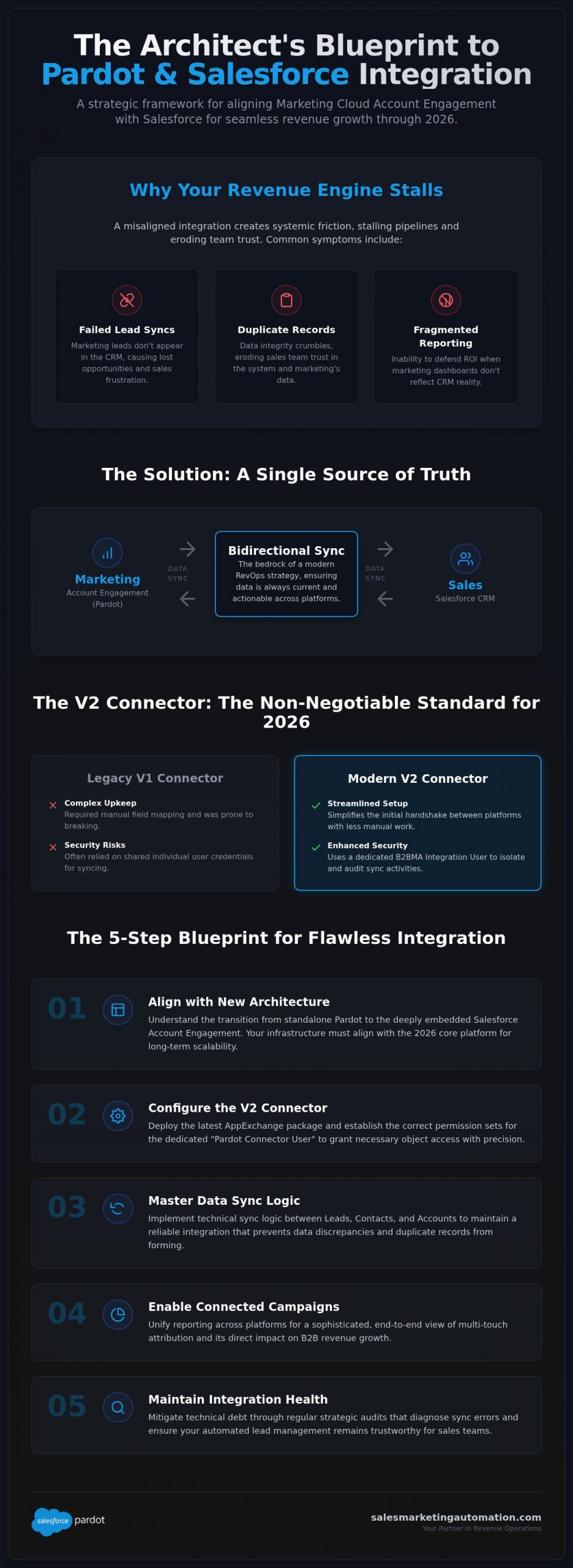
Orchestrating a high-performance pardot salesforce integration requires a shift from technical synchronization to strategic alignment. Enabling “Connected Campaigns” is the non-negotiable first step for any architect seeking a unified view of marketing performance. This feature bridges the gap between marketing initiatives and sales outcomes by creating a direct, one-to-one relationship between Pardot and Salesforce campaign records. By mapping these records, you unlock the ability to track multi-touch attribution, identifying exactly which assets contributed to a closed-won opportunity rather than relying on vague first-touch metrics.
Effective lead management relies on the precise interplay between scoring and grading. While scoring measures a prospect’s interest based on digital engagement, grading assesses their fit against your ideal customer profile. When these two metrics reach a predefined threshold, the integration triggers automated sales alerts within the CRM. To provide sales teams with full context, you must deploy Engagement History components directly on Salesforce page layouts. This allows reps to view every email open, link click, and form submission without leaving the lead record, fostering a more informed and collaborative sales environment.
Moving beyond siloed marketing lists creates a single source of truth for campaign performance across the entire organization. This architectural choice is essential for managing “Unassigned” prospects who haven’t yet met the criteria for sales handoff. By ensuring these prospects enter the correct automated nurture tracks, you prevent pipeline leakage and maintain engagement. For a granular guide on aligning your assets and folders, refer to our pardot setup and configuration checklist.
The 2026 landscape is defined by the integration of AI-driven Einstein Lead Scoring, which analyzes historical data to predict which prospects are most likely to convert. This capability is significantly enhanced by Agentforce, which uses integrated data to power autonomous marketing agents that can interact with prospects in real-time based on their sync status. Preparing your integration for these autonomous agents ensures your organization remains competitive as the industry moves toward self-optimizing revenue engines. If your current campaign structure is fragmented, a professional marketing automation audit is the logical next step to rebuild your orchestration from the ground up.
Success in a pardot salesforce integration doesn’t end at the initial deployment. Technical debt is an inevitable byproduct of evolving business requirements, changing Salesforce validation rules, and the continuous release of new platform features. If left unchecked, this debt manifests as broken syncs, orphaned records, and a gradual erosion of sales team trust in marketing data. Strategic architects recognize that an integration is a living framework that requires proactive governance to maintain its systemic integrity and long-term scalability.
Conducting a regular marketing automation audit is the most effective way to identify these hidden friction points before they impact the bottom line. An audit serves as a diagnostic deep-dive into your connector health, revealing specific data gaps and sync errors that standard dashboards might overlook. For high-growth B2B teams, managed services provide the continuous optimization needed to keep the revenue engine running at peak efficiency. This approach moves the conversation from reactive troubleshooting to a proactive, results-driven lifecycle that maximizes your technology investment.
Address “Sync Errors” within the Pardot dashboard immediately to prevent them from cascading into larger reporting discrepancies. These errors often stem from mismatched picklist values or Salesforce validation rules that block the B2BMA Integration User from updating records. The risk of “Dirty Data” is equally significant; duplicate records and incomplete profiles act as sand in the gears of your automation. When internal resources lack the bandwidth to resolve these complex architectural issues, engaging with top pardot consulting firms ensures that your platform is refined by experts who specialize in long-term operational health and systemic order.
Transitioning from a basic technical connection to true strategic alignment is a journey of refinement. It requires a documented data governance policy that clearly defines field ownership, sync directions, and cleanup schedules. This documentation ensures that your pardot salesforce integration remains resilient as your team scales and your data requirements grow more complex. By adopting the “Strategic Architect” mindset, you ensure that every technical configuration serves a specific business outcome. Secure your infrastructure today by scheduling a professional implementation audit to verify that your data flow is optimized for the demands of 2026 and beyond.
Constructing a high-performance pardot salesforce integration is a continuous journey of architectural refinement rather than a simple technical checkbox. By prioritizing the V2 connector’s native capabilities and enforcing rigorous bidirectional sync logic, you transform disparate platforms into a unified revenue engine. This alignment ensures that marketing engagement and sales execution operate in a state of controlled mastery; it provides the transparency needed for accurate attribution and scalable growth through 2026 and beyond.
Maintaining this level of operational health requires constant vigilance against technical debt and fragmented data sets. Our team provides expert technical implementation for enterprise B2B and managed services for continuous platform optimization. We specialize in identifying the subtle friction points that stall lead flow and erode sales trust. It’s time to move beyond basic synchronization and achieve true strategic orchestration that drives tangible results.
Optimize your revenue stack with a Pardot Strategic Audit to uncover hidden revenue leaks and secure your system’s integrity. Your infrastructure is the foundation of your commercial success; treat it with the precision it deserves.
The B2BMA Integration User is a specialized, non-human user record that facilitates the data flow between platforms without consuming a standard Salesforce license. It acts as the secure, dedicated conduit for the pardot salesforce integration, ensuring that background processes like field updates and prospect activity syncing occur automatically. This architectural shift from human-based connector users to a dedicated system user enhances security and simplifies permission management across your revenue stack.
Data typically synchronizes between the two platforms every two to five minutes. This near real-time frequency ensures that sales teams have immediate access to engagement data; however, the actual speed can fluctuate based on the volume of records in the sync queue. If you are performing a mass import or hitting your Salesforce API limits, you may experience temporary delays in record updates until the queue clears.
You cannot sync a single Pardot business unit with multiple Salesforce instances. The architecture is strictly designed for a one-to-one relationship to maintain data integrity and prevent conflicting record updates across disparate CRM environments. Organizations requiring support for multiple Salesforce orgs must deploy separate Pardot business units, each mapped to a specific Salesforce instance to ensure clean data governance.
If a lead is deleted in Salesforce, the corresponding prospect record remains in Pardot but becomes “orphaned” from its CRM counterpart. The integration will not automatically recreate the lead in Salesforce unless a specific action occurs, such as a new form submission or an automation rule that triggers a re-assignment. This behavior prevents the accidental cluttering of your CRM with previously discarded records.
Prospects generally fail to sync because they lack a designated owner or have not yet met the criteria for assignment. For a pardot salesforce integration to create a lead, the prospect must be assigned to a user, a queue, or an active assignment rule. Other common blockers include Salesforce validation rules that prevent the Integration User from creating records or a paused connector status within your Pardot settings.
Enable Connected Campaigns by navigating to Salesforce Marketing Setup and selecting the Account Engagement settings. Once you toggle the feature, you must select the Salesforce campaign record types you wish to sync and map your existing Pardot campaigns to the CRM. This process is essential for unifying your marketing assets and unlocking sophisticated multi-touch attribution reporting within Salesforce.
The V2 connector is the modern standard that utilizes a dedicated Integration User rather than a licensed human user to facilitate the platform handshake. Unlike the legacy V1 connector, which required manual configuration and a dedicated seat, V2 offers a more native, “plug-and-play” experience with enhanced security protocols. It is the mandatory version for all new implementations and offers superior stability for complex data environments. Organizations still weighing their platform options can benefit from a detailed pardot vs hubspot comparison to understand how these architectural differences affect total cost of ownership and long-term scalability.
Pardot can synchronize with Salesforce custom objects if your organization utilizes the Plus, Advanced, or Premium editions. This integration is read-only, meaning Pardot can ingest custom object data to trigger automation rules or segment lists but cannot write updates back to those records. This capability is vital for B2B teams that need to tailor their marketing based on unique data points like product subscriptions or service history.