 Sales & Marketing Automation
The CRM and Marketing Automation Guru's You Can Trust.
Sales & Marketing Automation
Current research indicates that 55% of CRM implementations fail to meet their planned objectives, frequently because of the silent erosion of automated processes. You likely recognize the symptoms: leads leaking through logic gaps, inaccurate scoring models that spark sales friction, and technical teams wasting hours on manual data overrides. Learning how to fix broken crm workflows is not a matter of applying a temporary patch; it requires a comprehensive realignment of your digital architecture to ensure long-term scalability.
We understand that your automation should serve as a precision engine for revenue, not a source of persistent operational debt. This guide provides a systematic, architect-level framework to help you diagnose systemic failures and restore the integrity of your pipeline. We will explore a diagnostic recovery process that eliminates manual intervention, provides clear visibility into workflow health, and transforms your CRM into a reliable driver of growth.
Identifying a failure in your automation engine requires a shift from passive observation to active diagnostics. When systems stop performing as intended, the symptoms often manifest as subtle irregularities rather than catastrophic crashes. Understanding these indicators is the essential first step in learning how to fix broken crm workflows and reclaiming your operational integrity. If left unaddressed, these technical fractures eventually compound into significant revenue loss.
Effective recovery begins with categorizing the specific type of failure occurring within your environment. Most architectural breakdowns fall into four primary categories:
Analyze your system’s execution history to uncover the technical root of the problem. In platforms like HubSpot and Salesforce, the audit log provides a granular view of every record’s journey through a workflow. Distinguish between “Action Failed” and “Action Skipped” errors. A failure typically indicates a technical integration issue or a missing required field; a skip usually suggests that the record no longer met the enrollment criteria at the moment of execution. Establishing automated alerts for these health metrics ensures you can intervene before a minor glitch becomes a systemic collapse.
Quantify the business cost of your technical failures to prioritize your repair efforts. Every hour a lead sits unassigned because of a broken trigger represents a direct hit to your conversion rates. Beyond immediate lead loss, there is a “Dirty Data” tax that erodes sales productivity as reps spend time manually correcting record properties instead of closing deals. Workflow Debt is the cumulative cost of unoptimized automation. By calculating the value of delayed follow-ups and inaccurate lead scores, you can build a compelling case for a comprehensive Marketing Automation Audit to stabilize your growth engine.
High-performance automation doesn’t fail because the software is inherently “broken.” Instead, failure occurs when the architectural foundation shifts or becomes overburdened by technical debt. Understanding these catalysts is vital when determining how to fix broken crm workflows at the root level. When you treat the underlying pathology rather than the visible symptom, you ensure the long-term stability of your revenue engine.
Several distinct factors typically contribute to systemic collapse within an enterprise CRM environment:
Standardized picklists are the backbone of a reliable system. Free text fields are the primary enemy of CRM workflows; they introduce human-driven variations, such as “VP” versus “Vice President,” that cause records to bypass critical entry points. Implementing strict validation rules protects these entry points, ensuring that only clean, formatted data triggers your high-value sequences. A comprehensive Marketing Automation Audit provides the clarity needed to identify these architectural fractures before they impact your quarterly targets.
Complexity often masquerades as sophistication. In many legacy setups, “spaghetti logic” dominates the landscape, characterized by dozens of overlapping rules that are difficult to track. In enterprise environments, deeply nested “If/Then” branches become so convoluted that they create massive technical overhead and slow down system performance. To restore health, you must consolidate redundant workflows and prioritize linear, transparent logic paths. Reducing this complexity doesn’t just fix the current error; it makes the entire system more resilient to future changes in your sales strategy. A rigorous marketing tech stack audit can expose the redundant tool subscriptions and broken data syncs that silently compound this complexity across your entire platform ecosystem.
Repairing a system requires more than tactical adjustments; it demands a disciplined, architectural intervention. When you are determining how to fix broken crm workflows, you must move beyond the “quick fix” mentality that often leads to recurring failures. A systematic recovery framework ensures that your repairs are durable, scalable, and fully integrated with your broader revenue strategy. This methodical approach prevents the introduction of new errors while resolving existing bottlenecks.
Follow this five-step recovery protocol to restore your automation engine:
Risk mitigation is the hallmark of a strategic architect. You should never “fix it live” in a production CRM environment, as even minor logic changes can trigger unforeseen cascades across integrated systems. Instead, create representative test records that mirror real-world edge cases, such as missing required fields or conflicting persona tags. Use these records to verify integration webhooks and third-party syncs before you even consider a full-scale deployment. This environment allows you to fail safely, ensuring that the final solution is foolproof.
Recovery logic must account for the historical gap created during the failure. When records miss specific steps in a lifecycle, a simple “on/off” switch isn’t enough to correct the timeline. Utilize batch updates to trigger workflows for historical data, but apply suppression lists to avoid duplicate email sends or redundant task assignments. By carefully managing the re-enrollment process, you restore the prospect’s journey without creating a disruptive experience for the end user or the sales team. It’s about precision, not just volume.
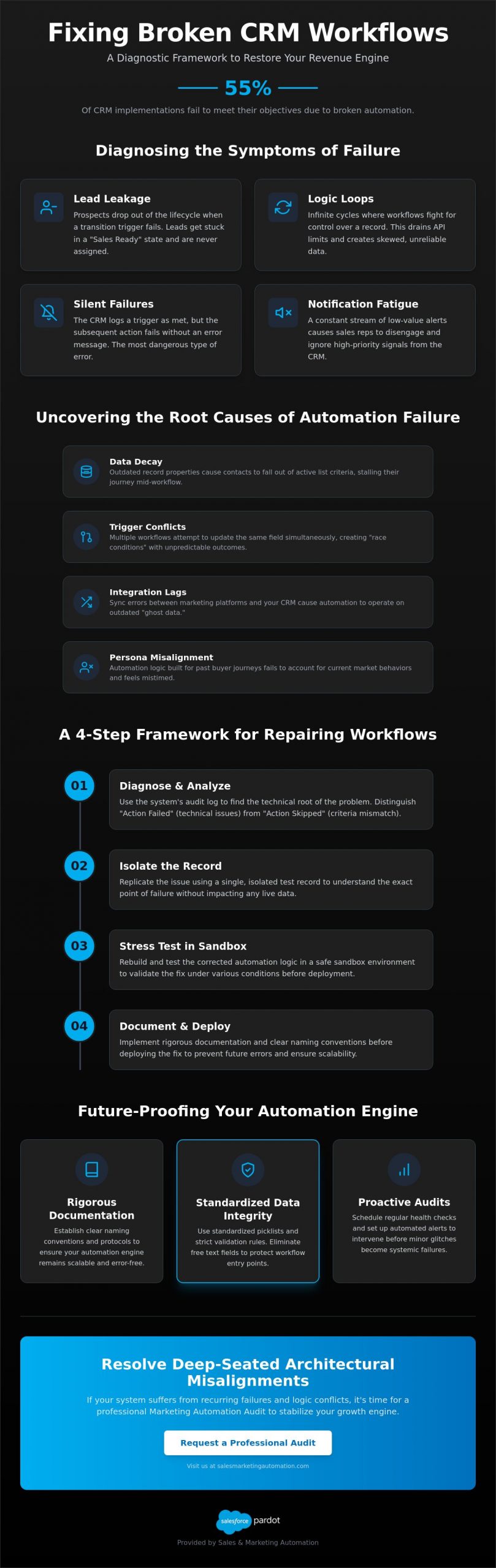
Scaling an automation engine requires more than just initial repair. It demands a commitment to systemic integrity that prevents future decay. Once you have established how to fix broken crm workflows, your focus must shift toward longevity and architectural discipline. Without a structured approach to maintenance, even the most sophisticated systems eventually succumb to entropy. High-growth organizations prioritize order over temporary speed to ensure their revenue infrastructure remains resilient.
Adopt a “Strategic Architect” approach to labeling and organization. Standardize your naming conventions across every department. Every workflow should follow a strict protocol that identifies the owner, the primary goal, and the trigger type at a glance. This clarity allows your technical team to navigate complex environments without deciphering legacy logic. Build a “Workflow Dictionary” for your team to serve as the single source of truth. This living document should detail the logic, dependencies, and expected outcomes of every automated process. Implement version control for multi-step sequences to track modifications over time, ensuring you can roll back to a stable state if a new change introduces unintended friction.
Transition from reactive firefighting to proactive maintenance through the Quarterly Audit. Scheduling regular reviews allows you to identify technical debt before it manifests as a system-wide failure. This cadence ensures your automation remains aligned with evolving business objectives and current data privacy regulations. It’s about maintaining a precision engine rather than waiting for the next breakdown to occur.
Establish clear permissions to control who can create or modify core logic. Unregulated access is a primary driver of automation failure in enterprise environments. Implement a “Request to Repair” process for internal stakeholders to ensure that all changes undergo technical review before deployment. Aligning these governance standards with your broader HubSpot implementation pricing ensures that your total cost of ownership remains predictable and your ROI remains high. Strategic oversight prevents the “spaghetti logic” that often forces expensive, full-scale migrations later.
Construct a “Workflow Health Dashboard” to track conversion rates and record throughput in real-time. Use dedicated error-handling workflows to catch failures as they occur, rather than waiting for feedback from frustrated sales representatives. Industry data suggests that automated error-reporting reduces time-to-resolution by 70% by providing immediate visibility into the specific point of failure. This proactive stance transforms your CRM from a static database into a self-correcting revenue engine.
Secure your system’s future by scheduling a professional Marketing Automation Audit to eliminate technical debt and optimize your pipeline.
Internal teams often reach a plateau where tactical adjustments no longer yield significant performance gains. While the framework provided in previous sections offers a robust starting point for technical recovery, enterprise-level environments frequently harbor deeply embedded architectural flaws that remain invisible to those working within the system daily. Recognizing the limits of internal “quick fixes” is a hallmark of a mature revenue leader. When your team spends more time managing manual data overrides than executing strategic campaigns, it’s time to consider a professional intervention to determine how to fix broken crm workflows at scale.
Transitioning from a reactive state to a “best-in-class” revenue operation requires a shift in perspective. A dedicated CRM architect doesn’t just repair existing errors; they rebuild your automation engine to support future growth and technical resilience. This level of expertise ensures that your Lifecycle Automation remains fluid and that your sales team operates with high-integrity data. Professional managed services provide the continuous optimization and scalability needed to stay ahead of evolving buyer journeys and complex market shifts.
A professional Marketing Automation Audit serves as a comprehensive diagnostic of your entire digital ecosystem. During a fixed-fee strategic audit, implementation experts analyze your lead routing logic, data synchronization health, and trigger performance across integrated platforms like Salesforce and HubSpot. These specialists uncover hidden pipeline leaks that internal teams often overlook, such as misaligned lead scoring or orphaned records that bypass critical assignment rules. The result is a clear, actionable roadmap that moves your organization from technical repair toward sustainable revenue growth. To understand the full scope of what this process entails in today’s environment, reviewing the strategic guide to marketing automation audits in 2026 provides essential context for evaluating your current architecture against modern best practices.
Specialized consulting consistently outperforms generalist internal hires when managing complex CRM Data Migration or multi-platform integrations. Implementation partners bring a breadth of experience gathered from diverse industries, allowing them to anticipate edge cases and architectural conflicts before they disrupt your operations. This partnership isn’t just about technical execution; it’s about building a foundation of technical excellence that empowers your internal team to focus on high-value strategy rather than troubleshooting logic loops. By aligning with an expert partner, you secure a long-term resource for systemic health and operational efficiency.
Don’t allow unoptimized automation to stall your growth. Reclaim your pipeline and ensure your systems are engineered for precision. Schedule your Strategic Marketing Automation Audit today to restore your revenue engine.
Reclaiming a stalling revenue pipeline requires a shift from reactive troubleshooting to proactive architectural refinement. You’ve learned that sustainable success depends on identifying root causes like data decay and trigger conflicts while utilizing a disciplined sandbox methodology for all repairs. Establishing rigorous governance and documentation standards ensures that your automation remains a precision engine rather than a source of technical debt. Mastering how to fix broken crm workflows is the definitive step toward building a scalable, high-performance revenue operation.
Our boutique agency brings a global perspective to every engagement; we’ve completed over 100 successful CRM implementations with deep expertise in HubSpot, Salesforce, and Pardot. We don’t just provide patches; we build enduring frameworks that align your technology with your business objectives. To secure your system’s integrity and eliminate hidden pipeline leaks, Request a Comprehensive Marketing Automation Audit. Your path to an error-free, high-velocity automation engine begins with a single strategic intervention. We look forward to helping you architect a more resilient future for your business.
Analyze your audit logs for “Action Failed” statuses and monitor lead velocity through your pipeline. If prospects are stalling in a specific lifecycle stage or internal notifications aren’t firing as expected, your logic is likely fractured. You should also watch for data inconsistencies where record properties don’t match the expected output of your automation sequences. These subtle discrepancies often signal a deeper architectural failure.
Yes, duplicate records frequently occur when integration loops or race conditions exist within your system. If two competing workflows attempt to update the same record property simultaneously, they can trigger redundant creation events or sync errors. This behavior is common in unoptimized environments where multiple platforms fight for control over a single data point. Establishing clear lead-source authority is essential to prevent this type of database corruption.
Enrollment criteria misalignment is the most frequent cause of trigger failure in HubSpot environments. Records often fail to enter a workflow because they don’t meet every specific filter requirement, or the property change occurred via a source that wasn’t configured to trigger a re-enrollment event. Understanding the nuances of “and/or” logic is vital when learning how to fix broken crm workflows and ensuring consistent record processing.
Always deactivate a workflow rather than deleting it entirely. Deactivation preserves the execution history and versioning data, which is essential for diagnosing the technical root of the failure. If you delete the workflow, you lose the historical context needed to prevent the error from recurring. Once you’ve successfully tested a replacement in your sandbox, you can safely archive the legacy version to maintain a clean environment.
Schedule a comprehensive audit at least once per quarter to maintain systemic integrity. High-growth environments experience rapid data decay and shifting buyer journeys; a 90-day cadence ensures your architecture remains aligned with your current revenue goals. Regular audits allow you to identify technical debt and unoptimized logic before they manifest as lead leakage. This proactive maintenance is far more cost-effective than reactive firefighting after a system-wide collapse.
The record will process through every active step from the beginning of the sequence. This can result in duplicate email sends or redundant task assignments if you haven’t implemented proper suppression lists. To avoid disrupting the prospect’s experience, use “if/then” branches to bypass previously completed actions. This targeted approach ensures the record only receives the missing updates without repeating the entire lifecycle journey.
Prioritize modular, smaller workflows over monolithic sequences. Large workflows are difficult to troubleshoot and often contain “spaghetti logic” that increases the risk of systemic failure. By breaking your automation into smaller, purpose-built components, you create a more flexible architecture that’s easier to document and maintain. This modular strategy reduces technical overhead and allows your team to update specific segments of the journey without risking the entire engine.
Verify your field mapping and connector user permissions as the first step in your diagnostic process. Sync errors often stem from mismatched picklist values or required fields in Salesforce that aren’t being populated by Pardot forms. Ensure that both systems share a standardized vocabulary for all high-value properties. If the synchronization remains fractured, a professional Marketing Automation Audit may be required to resolve deep-seated architectural conflicts between the platforms.