 Sales & Marketing Automation
The CRM and Marketing Automation Guru's You Can Trust.
Sales & Marketing Automation
Is your HubSpot portal functioning as a high-performance revenue engine, or has it become a graveyard of “zombie” triggers and overlapping logic? You likely recognize that fragmented data between sales and marketing is no longer just a minor friction point; it’s a structural barrier to growth. Many RevOps leaders find themselves buried under automation debt, where messy hubspot workflow automation creates more manual cleanup than it actually saves in time.
It’s time to transition from reactive troubleshooting to intentional system design. This article provides the architectural frameworks required to eliminate manual friction and drive predictable B2B revenue. You’ll learn how to construct seamless lead-to-revenue handoffs and maintain pristine CRM health through automated data hygiene. We will examine strategic examples of advanced lifecycle triggers and high-intent routing, leveraging the 2026 Breeze AI and Data Hub updates to ensure your operations remain both scalable and precise.
Strategic hubspot workflow automation is far more than a tool for sending automated emails. It functions as the central nervous system of a scalable Revenue Operations architecture. While many teams view automation through the narrow lens of marketing follow-ups, elite organizations treat it as the orchestration of complex B2B data and engagement across the entire customer journey. This shift requires moving away from linear, one-size-fits-all sequences toward dynamic, multi-branching engines that respond to real-time buyer behavior and data signals.
The distinction between tiers is critical for teams planning their 2026 growth. Simple automation available in the HubSpot Starter tier provides basic task triggers, but it lacks the logic gates necessary for enterprise-grade operations. True hubspot workflow automation is unlocked at the Professional and Enterprise levels, where cross-object triggers and advanced branching allow for a sophisticated lifecycle automation strategy. By transitioning to these advanced frameworks, businesses can move beyond “batch and blast” tactics and toward a system that intelligently manages high-intent leads without manual intervention.
Revenue Operations (RevOps) professionals view workflows as the structural foundation of the business. Historically, Marketing automation focused exclusively on the top of the funnel. Today, the focus has shifted to “Revenue Automation,” which unifies Sales, Marketing, and Service Hubs into a single, cohesive ecosystem. When you build workflows as business architecture, you don’t just solve for efficiency; you solve for scalability. This structured approach directly impacts key business metrics by lowering Customer Acquisition Costs (CAC) through reduced manual labor and increasing Lifetime Value (LTV) through automated, personalized retention triggers. It’s about building a framework that supports long-term operational health rather than temporary fixes.
A broken automation engine is often worse than no automation at all. Signs of failure include duplicate lead creation, missed follow-ups, and fragmented data silos that leave sales reps guessing which leads to prioritize. Manual data entry is a primary source of friction in high-growth B2B sales cycles, often leading to human error and missed revenue opportunities. Before constructing new logic, it’s essential to perform a comprehensive marketing automation audit to identify where current workflows are overlapping or conflicting. This diagnostic phase ensures that your technical stack is optimized for precision, preventing the accumulation of technical debt that can cripple a growing organization’s efficiency.
High-performance hubspot workflow automation relies on the synergy of three architectural pillars: Triggers, Logic Gates, and Actions. Triggers act as the catalyst for the process, Logic Gates serve as the decision-making engine, and Actions represent the final execution. To build a system that scales, you must move beyond simple linear paths and embrace the power of cross-object triggers. For instance, a Deal stage change in the Sales Hub can automatically trigger a Contact property update or a Task creation for an account manager. This cross-departmental alignment is central to a Winning Revenue Operations Strategy, as it ensures that data remains synchronized across different record types without manual intervention.
Precision in execution also requires a deep understanding of re-enrollment logic and suppression mechanisms. Re-enrollment allows contacts to repeat a workflow, which is essential for high-frequency actions like “Request a Demo” submissions. However, without strict governance, this can lead to redundant communications. Suppression Lists serve as a critical safety mechanism here, automatically removing contacts from specific workflows to protect brand integrity and prevent “automation fatigue” during complex sales cycles. If your current logic feels cluttered, a professional technical implementation audit can help refine these safety parameters.
Modern triggers extend far beyond simple form fills or page views. Utilizing “Contact Property” changes allows for immediate sales intervention when a lead’s status shifts into a high-intent segment. Leveraging event-based triggers from integrated third-party platforms, such as webinar engagement or product usage data, provides deeper context for timely outreach. For specialized business models, Custom Objects can trigger bespoke hubspot workflow automation flows that standard CRM objects cannot accommodate, allowing for highly industry-specific operations.
Logic Gates are the decision-making nodes of a CRM that route records based on specific criteria. Using If/Then branching allows you to segment leads dynamically based on your lead scoring model setup. This ensures that high-value MQLs follow an accelerated path while lower-intent subscribers receive long-term nurturing. Timing must also be engineered with precision. While “Wait” steps provide a fixed pause, “Delay until” steps allow the system to wait for a specific behavior, such as a contact visiting a pricing page, before moving to the next action. This level of granularity transforms basic automation into a sophisticated revenue engine.
To achieve operational excellence, your hubspot workflow automation must mirror the complexity of your modern sales cycle. Sophisticated B2B environments require more than simple “if-this-then-that” logic; they demand an ecosystem that responds to the nuances of buyer behavior and account-level data. By deploying advanced architectural frameworks, you can ensure that every lead is handled with precision while maintaining a lean operational footprint.
Consider these four strategic examples for your 2026 RevOps roadmap:
Automating the transition from Marketing Lead to Sales Qualified Lead (SQL) removes subjectivity from the process. By integrating lead scoring thresholds as enrollment triggers, you ensure that only prospects with a verified intent score reach your sales team. These hubspot workflow automation engines create a seamless bridge between departments by automating internal notifications to Slack or email. This ensures that sales reps have the full context of a lead’s marketing history the moment they begin their outreach. A structured lead management automation framework ensures this handoff is engineered with the precision needed to stop high-intent buyers from slipping through the cracks of manual follow-up.
Revenue growth doesn’t end at the initial contract; it expands through retention and advocacy. A strategic handoff workflow from Sales Hub to Service Hub ensures a frictionless onboarding experience by automatically creating success tickets and assigning account managers. You can also trigger “Upsell” paths based on product usage data or approaching renewal dates. Integrating Net Promoter Score (NPS) triggers allows the system to identify promoters automatically, triggering requests for testimonials or referrals when customer satisfaction is at its peak.
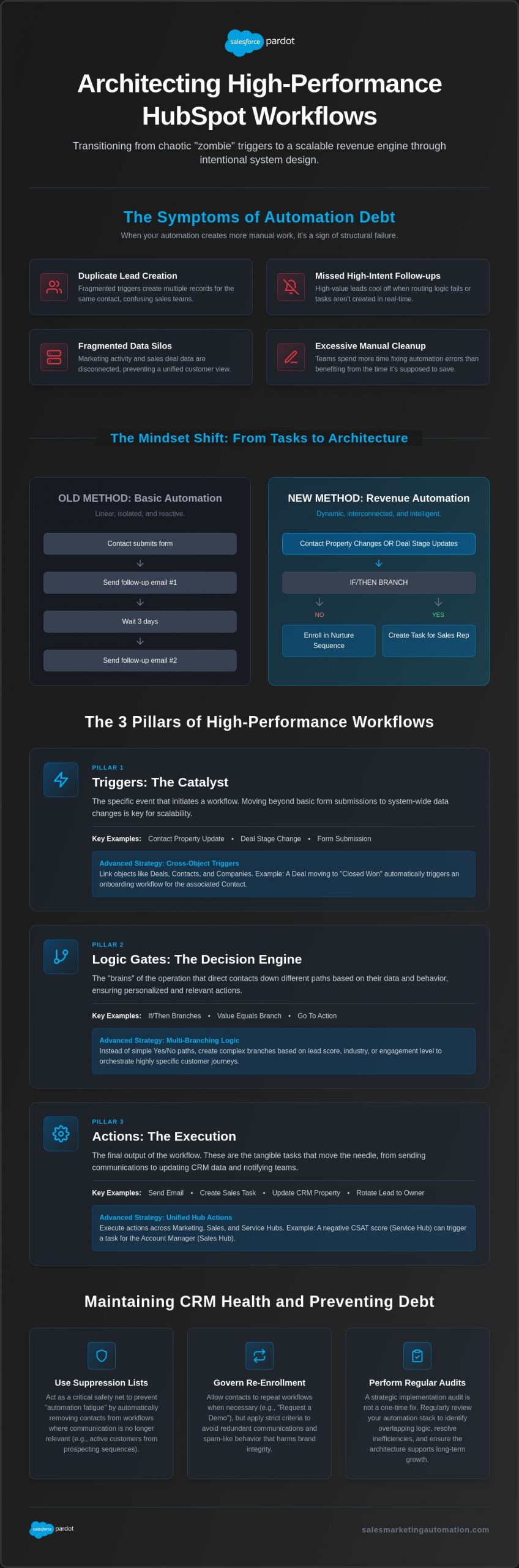
Automation debt represents the technical and operational burden created by redundant, conflicting, or poorly documented logic within your CRM. In high-growth environments, hubspot workflow automation can quickly shift from a strategic asset to a structural liability if left unmanaged. To maintain systemic integrity, you must enforce rigorous governance standards that prioritize clarity and long-term stability over short-term fixes. When multiple workflows attempt to update the same property simultaneously, they create “race conditions” that result in data corruption and broken customer experiences.
Establish a standardized naming syntax to ensure every team member understands a workflow’s purpose at a glance. A proven framework is [Business Unit] | [Lifecycle Stage] | [Core Function]. For example, a workflow might be named “Sales | MQL | Lead Rotation.” Combine this with a folder hierarchy organized by function rather than department. Documentation is non-negotiable for scaling teams. You should maintain an external “Automation Map” that visualizes how different workflows interact, alongside internal descriptions within HubSpot that explain the specific business logic behind complex branching.
Pruning “Zombie Workflows” is a critical component of healthy system maintenance. These are active workflows that have had zero enrollments for over 90 days or are tied to retired marketing campaigns. Schedule a quarterly audit cadence to identify these outliers and deactivate them. This practice reduces the “noise” in your portal and prevents legacy logic from interfering with new strategic initiatives. If your current portal is cluttered with legacy logic, it’s time to secure a professional marketing automation audit to restore operational health and precision.
Managing system access is the first line of defense against accidental breakage. Restrict “Super Admin” permissions to a core group of technical architects, while providing “Edit” access only to those who require it for specific campaign builds. If a logic error occurs, use HubSpot’s “Workflow Revision History” to identify exactly when a change was made and who made it. This tool is invaluable for troubleshooting unexpected enrollment spikes. Before publishing any change, always utilize the “Test” feature with a sandbox contact record to verify that every branching path functions as intended.
Tracking the performance of your automation stack is essential for justifying RevOps investments. Focus on lead velocity, workflow conversion rates, and the estimated manual hours saved by your architectural builds. Build specialized HubSpot Dashboards to monitor these metrics in real time, allowing you to identify which engines are driving revenue and which require optimization. To calculate the ROI of a specific workflow, subtract the total cost of technical development and seat maintenance from the total revenue generated through attributed conversions, then divide that figure by the initial investment cost.
Constructing a sophisticated hubspot workflow automation environment is a continuous engineering project rather than a one-time configuration. While the frameworks discussed in this guide provide the blueprint for scalable growth, the reality of enterprise implementation often reveals hidden technical hurdles and data inconsistencies. Sales & Marketing Automation (SMA) serves as your strategic architect, providing the technical expertise required to transform fragmented CRM environments into unified revenue engines. We specialize in complex technical implementations and CRM migrations that ensure your automation stack remains resilient as your business scales.
Our managed services model focuses on the continuous optimization of your workflow ecosystem. By providing an elite third-party perspective, we identify the operational blind spots that internal teams often overlook, such as conflicting logic between Sales and Service Hubs or underutilized Data Hub triggers. We move your operations beyond simple automated tasks toward an optimized revenue architecture that prioritizes precision, systemic integrity, and tangible business outcomes. This proactive approach prevents the accumulation of technical debt and ensures that your CRM remains a source of truth rather than a point of friction.
Our methodical approach begins with a diagnostic phase to identify and fix broken CRM workflows that disrupt the lead-to-revenue journey. We align your technical stack with your 2026 revenue goals by leveraging the latest HubSpot Enterprise features, including Breeze AI agents and advanced Data Hub orchestration. Beyond technical configuration, SMA provides custom creative and technical design services to ensure your B2B campaigns are as engaging as they are functional. We don’t just build workflows; we build enduring frameworks that support high-performance revenue operations.
Standard onboarding procedures are rarely sufficient for enterprise-level B2B companies with complex sales cycles and high data volumes. To achieve true scalability, you need a partner who understands the intersection of technical architecture and strategic growth. A diagnostic assessment of your current portal can uncover significant inefficiencies that are currently leaking revenue or inflating your customer acquisition costs. Don’t let legacy logic or messy data hinder your 2026 growth initiatives. Secure your HubSpot technical audit today and take the first step toward a more precise, automated, and scalable future.
Mastering hubspot workflow automation requires a deliberate transition from reactive task management to proactive system architecture. By prioritizing cross-object triggers and rigorous governance standards, you eliminate the operational friction that frequently stalls B2B growth. High-performing RevOps leaders recognize that a clean, well-documented CRM is not a luxury; it’s a prerequisite for scaling complex sales cycles and maintaining lead velocity. Establishing these frameworks today ensures your infrastructure remains resilient against the technical debt of tomorrow.
Constructing these enduring systems demands technical precision and a deep understanding of how integrated tech stacks function in a high-stakes environment. With more than 100 successful implementations, Sales & Marketing Automation (SMA) serves as your strategic partner in navigating these technical complexities. As expert B2B lifecycle architects and technical stack integration specialists, we help you transform fragmented data into a unified, high-performance revenue engine. Schedule your HubSpot Strategic Audit with Sales & Marketing Automation to identify structural blind spots and optimize your portal for maximum efficiency. Your path toward a scalable, automated future is within reach.
Sequences are designed for individualized sales outreach, allowing reps to send personalized email threads and create manual tasks for 1:1 engagement. In contrast, hubspot workflow automation is an architectural tool used for broad marketing campaigns, backend data management, and cross-departmental orchestration. While sequences pause once a contact replies, workflows continue executing logic based on complex branching and property changes regardless of direct interaction.
Subscription tiers dictate your operational capacity within the platform. HubSpot Professional accounts are limited to 300 workflows for Marketing, Sales, or Service Hubs, while Data Hub Professional allows up to 400. Enterprise subscriptions significantly expand this architecture, offering up to 1,000 workflows for core Hubs and 1,100 for the Data Hub. These limits include both active and inactive workflows, which necessitates the quarterly pruning of legacy logic.
Workflows integrate with external platforms to maintain ecosystem alignment across your technical stack. You can trigger Slack notifications to alert sales teams of high-intent activity or sync data directly with Salesforce to ensure pipeline consistency. These integrations allow HubSpot to function as a central command center, pushing and pulling data across various software to eliminate manual entry and fragmented silos.
One frequent error is the accumulation of automation debt caused by overlapping logic and conflicting triggers that create “race conditions” in your data. Teams often fail to implement suppression lists, which leads to prospects receiving redundant or contradictory communications. Additionally, neglecting to document the business logic within the workflow makes troubleshooting difficult for future administrators, often resulting in systemic breakage during portal updates.
Implement lead management by using a “HubSpot Score” property change as an enrollment trigger. Once a lead crosses a specific numerical threshold, the workflow automatically updates the Lifecycle Stage to MQL and routes the record to the appropriate owner based on territory, industry, or company size. This ensures that high-value prospects are transitioned to sales with full context and zero manual delay.
Automated deduplication is primarily handled through the Data Hub using AI-powered tools that identify and merge records based on name and email matching. While standard hubspot workflow automation can format data to prevent new duplicates, the Data Hub provides a dedicated dashboard for ongoing maintenance. This process is vital for reporting integrity and prevents sales reps from engaging the same prospect through multiple records.
Success is measured by tracking lead velocity and workflow conversion rates within specialized HubSpot dashboards. Calculate ROI by comparing the revenue generated from attributed conversions against the total costs of technical development and seat licensing. Monitoring the “manual hours saved” metric also provides a clear indicator of operational efficiency and the structural health of your revenue engine.
Enrollment triggers are the specific criteria, such as form submissions or property changes, that initiate a workflow. For B2B, the most effective triggers focus on high-intent actions like viewing a pricing page or downloading technical documentation. You should also utilize triggers based on firmographic property changes to ensure your automation responds dynamically to the evolving profile of your target accounts.